
- HTML to PDF APIConvert HTML and URLs into PDFsPDF Form Fields APIAdd fillable fields to any PDFExtract PDF Form Data APIEasily extract data from PDFsWatermark PDF APIAdd custom watermarks to PDFsProtect PDF APISecure your PDFs with passwordCompress PDF APIReduce file size without losing qualityFlatten PDF APIFlatten PDFs to make form permanentDigital Signature APISend documents for signing
- API DocumentationAPI DocumentationFull REST API referenceNodeJS SDKClient library for Node.jsJava SDKClient library for JavaC# SDKClient library for C#PHP SDKClient library for PHPPython SDKClient library for Python
- Pricing
- Contact Us
Automate PDF Generation and Document Workflows with PDFGate and viaSocket
Connect PDFGate with thousands of applications through viaSocket to automate PDF generation, document processing, delivery, and digital-signature workflows.
PDFGate is now available on viaSocket, a no-code workflow automation platform that connects thousands of apps. The integration lets you generate documents, process existing PDFs, and send files out for digital signing directly inside an automated workflow, with no custom code. Pick a trigger from any connected app, add a PDFGate action, and each document is created and delivered on its own.
Key takeaways
- Add PDFGate as an action in any viaSocket workflow, with no custom backend or code.
- Any trigger can start it: a new order or payment, a form submission, a CRM record, a schedule, or a webhook.
- One integration covers generating PDFs, processing existing documents, and reacting to digital-signature envelope events.
How the integration works
Every viaSocket workflow is a trigger followed by one or more actions. PDFGate slots into the action step: the trigger supplies the data, PDFGate turns it into a finished PDF from your HTML or a live URL (the same web page to PDF conversion that powers the API), and later steps store or deliver the result.
What You Can Automate
A single action can slot into almost any workflow. A few common ones:
- Invoices: when an order or payment record is created, turn the data into a branded PDF. See generating invoice PDFs in Node.js for the full pattern.
- Reports: pull data from a CRM, spreadsheet, or form and turn it into a downloadable PDF.
- Storage and delivery: once a document is generated, save it to cloud storage or send it by email automatically.
- Post-signing steps: react to Envelope Sent, Envelope Completed, or Envelope Document Completed to update a record or notify a team.
Example: Generating an Invoice
Here’s a real workflow: an HTML invoice template is turned into a PDF using the Create PDF from URL HTML action, configured with an HTML content source and a standard A4 page size.
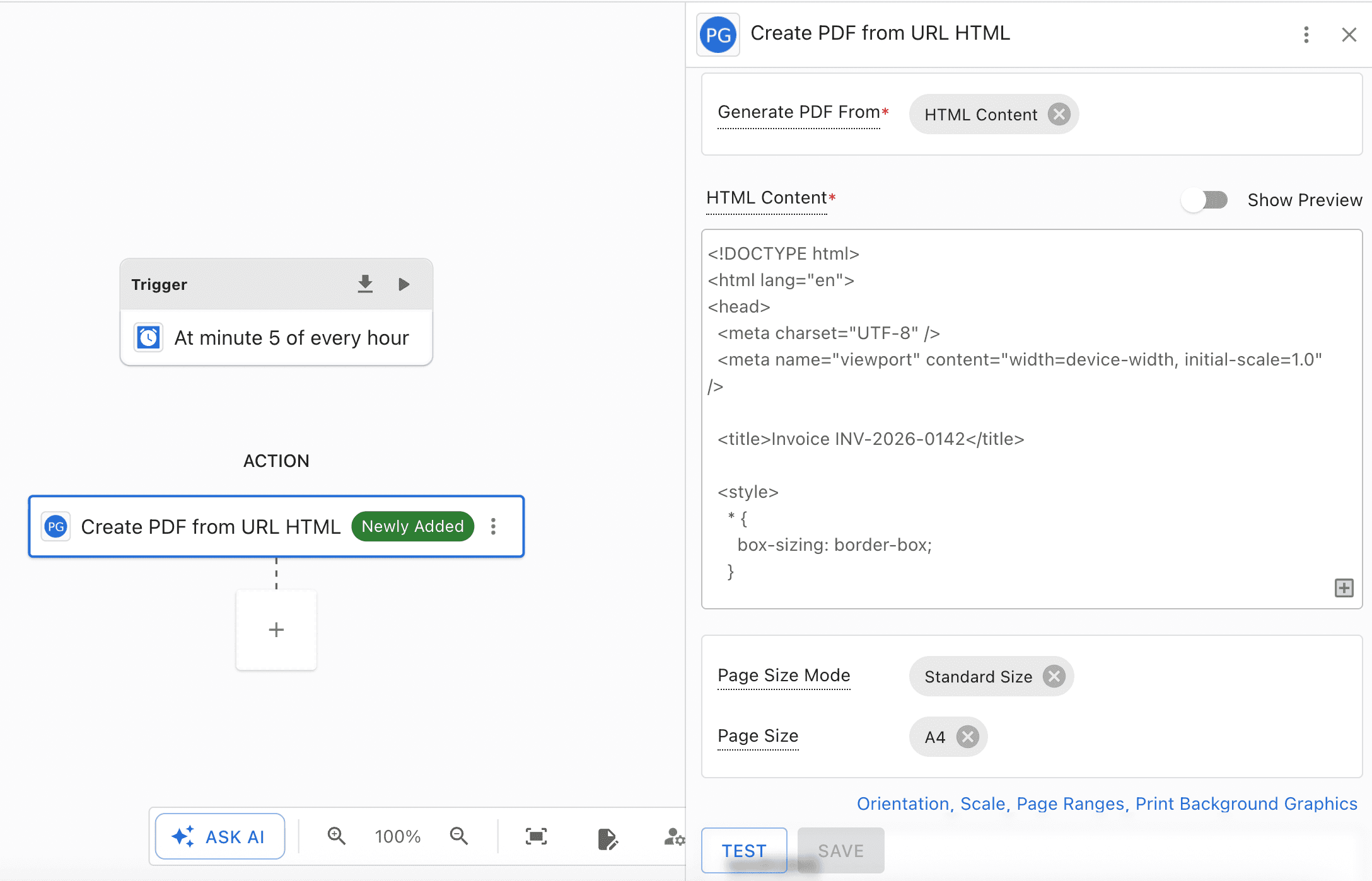
The HTML below is the exact template behind that action. It’s plain markup and inline CSS, with no external assets:
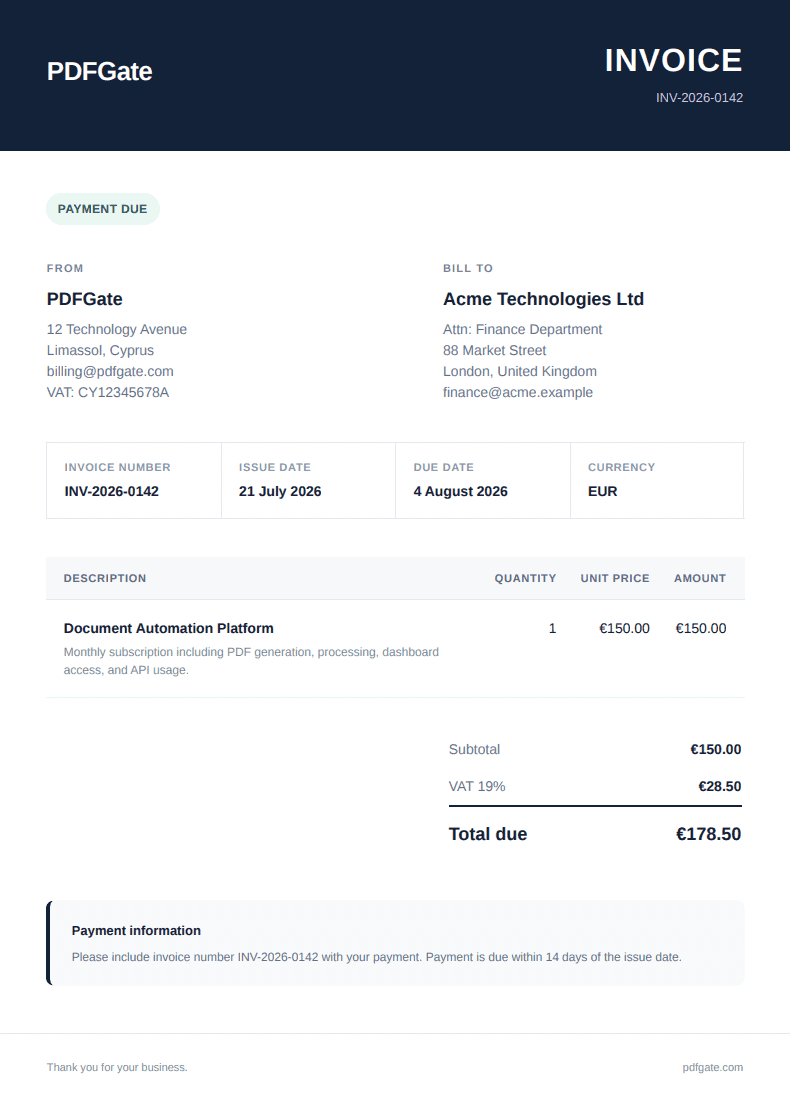
1<!DOCTYPE html>2<html lang="en">3<head>4 <meta charset="UTF-8" />5 <meta name="viewport" content="width=device-width, initial-scale=1.0" />67 <title>Invoice INV-2026-0142</title>89 <style>10 * {11 box-sizing: border-box;12 }1314 body {15 margin: 0;16 background: #f4f6f8;17 color: #172033;18 font-family: Arial, Helvetica, sans-serif;19 font-size: 14px;20 line-height: 1.5;21 }2223 .invoice {24 width: 100%;25 max-width: 1000px;26 margin: 0 auto;27 background: #ffffff;28 border-radius: 16px;29 overflow: hidden;30 box-shadow: 0 12px 35px rgba(25, 35, 58, 0.08);31 }3233 .header {34 padding: 42px 48px;35 background: #132238;36 color: #ffffff;37 }3839 .header-table,40 .details-table,41 .summary-table,42 .footer-table {43 width: 100%;44 border-collapse: collapse;45 }4647 .logo {48 font-size: 26px;49 font-weight: 700;50 letter-spacing: -0.6px;51 }5253 .invoice-label {54 text-align: right;55 }5657 .invoice-label h1 {58 margin: 0 0 4px;59 font-size: 32px;60 font-weight: 700;61 letter-spacing: 1px;62 }6364 .invoice-label p {65 margin: 0;66 color: #c9d2df;67 font-size: 13px;68 }6970 .content {71 padding: 42px 48px 48px;72 }73 .status-row {74 margin-bottom: 34px;75 }7677 .status {78 display: inline-block;79 padding: 7px 12px;80 background: #eaf8f0;81 color: #18794e;82 border-radius: 999px;83 font-size: 12px;84 font-weight: 700;85 letter-spacing: 0.4px;86 text-transform: uppercase;87 }8889 .details-table {90 margin-bottom: 38px;91 }9293 .details-table td {94 width: 50%;95 vertical-align: top;96 }9798 .details-table td:last-child {99 padding-left: 48px;100 }101102 .section-title {103 margin: 0 0 10px;104 color: #788397;105 font-size: 11px;106 font-weight: 700;107 letter-spacing: 1.2px;108 text-transform: uppercase;109 }110111 .company-name {112 margin: 0 0 6px;113 color: #172033;114 font-size: 18px;115 font-weight: 700;116 }117118 .muted {119 color: #667085;120 }121122 .meta {123 width: 100%;124 margin-bottom: 38px;125 border-collapse: collapse;126 border: 1px solid #e5e9ef;127 border-radius: 10px;128 }129130 .meta td {131 width: 25%;132 padding: 16px 18px;133 border-right: 1px solid #e5e9ef;134 vertical-align: top;135 }136137 .meta td:last-child {138 border-right: 0;139 }140141 .meta-label {142 display: block;143 margin-bottom: 5px;144 color: #8a94a6;145 font-size: 11px;146 font-weight: 700;147 letter-spacing: 0.7px;148 text-transform: uppercase;149 }150151 .meta-value {152 color: #172033;153 font-weight: 700;154 }155156 .items {157 width: 100%;158 margin-bottom: 30px;159 border-collapse: collapse;160 }161162 .items thead th {163 padding: 13px 12px;164 background: #f5f7fa;165 color: #596579;166 border-bottom: 1px solid #e2e7ee;167 font-size: 11px;168 letter-spacing: 0.7px;169 text-align: left;170 text-transform: uppercase;171 }172173 .items tbody td {174 padding: 18px 12px;175 border-bottom: 1px solid #edf0f4;176 vertical-align: top;177 }178179 .items th:first-child,180 .items td:first-child {181 padding-left: 18px;182 }183184 .items th:last-child,185 .items td:last-child {186 padding-right: 18px;187 }188189 .items .number {190 text-align: right;191 white-space: nowrap;192 }193194 .item-name {195 color: #172033;196 font-weight: 700;197 }198199 .item-description {200 margin-top: 4px;201 color: #7b8495;202 font-size: 12px;203 }204205 .summary-wrapper {206 width: 100%;207 margin-top: 12px;208 }209210 .summary-spacer {211 width: 53%;212 }213214 .summary-cell {215 width: 47%;216 padding-left: 32px;217 }218219 .summary-table td {220 padding: 8px 0;221 }222223 .summary-table td:last-child {224 text-align: right;225 font-weight: 700;226 }227228 .summary-table .total-row td {229 padding-top: 14px;230 border-top: 2px solid #172033;231 color: #172033;232 font-size: 18px;233 font-weight: 700;234 }235236 .notes {237 margin-top: 42px;238 padding: 20px 22px;239 background: #f7f9fc;240 border-left: 4px solid #132238;241 border-radius: 8px;242 }243244 .notes h3 {245 margin: 0 0 7px;246 font-size: 13px;247 }248249 .notes p {250 margin: 0;251 color: #657084;252 font-size: 12px;253 }254255 .footer {256 padding: 24px 48px 30px;257 border-top: 1px solid #e8ecf1;258 color: #80899a;259 font-size: 11px;260 }261262 .footer td:last-child {263 text-align: right;264 }265266 @media print {267 body {268 padding: 0;269 background: #ffffff;270 }271272 .invoice {273 max-width: none;274 border-radius: 0;275 box-shadow: none;276 }277 }278 </style>279</head>280281<body>282 <div class="invoice">283 <header class="header">284 <table class="header-table">285 <tr>286 <td>287 <div class="logo">288 PDFGate289 </div>290 </td>291292 <td class="invoice-label">293 <h1>INVOICE</h1>294 <p>INV-2026-0142</p>295 </td>296 </tr>297 </table>298 </header>299300 <main class="content">301 <div class="status-row">302 <span class="status">Payment due</span>303 </div>304305 <table class="details-table">306 <tr>307 <td>308 <p class="section-title">From</p>309 <p class="company-name">PDFGate</p>310 <div class="muted">311 12 Technology Avenue<br />312 Limassol, Cyprus<br />313 [email protected]<br />314 VAT: CY12345678A315 </div>316 </td>317318 <td>319 <p class="section-title">Bill to</p>320 <p class="company-name">Acme Technologies Ltd</p>321 <div class="muted">322 Attn: Finance Department<br />323 88 Market Street<br />324 London, United Kingdom<br />325 [email protected]326 </div>327 </td>328 </tr>329 </table>330331 <table class="meta">332 <tr>333 <td>334 <span class="meta-label">Invoice number</span>335 <span class="meta-value">INV-2026-0142</span>336 </td>337338 <td>339 <span class="meta-label">Issue date</span>340 <span class="meta-value">21 July 2026</span>341 </td>342343 <td>344 <span class="meta-label">Due date</span>345 <span class="meta-value">4 August 2026</span>346 </td>347348 <td>349 <span class="meta-label">Currency</span>350 <span class="meta-value">EUR</span>351 </td>352 </tr>353 </table>354355 <table class="items">356 <thead>357 <tr>358 <th>Description</th>359 <th class="number">Quantity</th>360 <th class="number">Unit price</th>361 <th class="number">Amount</th>362 </tr>363 </thead>364365 <tbody>366 <tr>367 <td>368 <div class="item-name">Document Automation Platform</div>369 <div class="item-description">370 Monthly subscription including PDF generation, processing,371 dashboard access, and API usage.372 </div>373 </td>374 <td class="number">1</td>375 <td class="number">€150.00</td>376 <td class="number">€150.00</td>377 </tr>378379 </tbody>380 </table>381382 <table class="summary-wrapper">383 <tr>384 <td class="summary-spacer"></td>385386 <td class="summary-cell">387 <table class="summary-table">388 <tr>389 <td class="muted">Subtotal</td>390 <td>€150.00</td>391 </tr>392393 <tr>394 <td class="muted">VAT 19%</td>395 <td>€28.50</td>396 </tr>397398 <tr class="total-row">399 <td>Total due</td>400 <td>€178.50</td>401 </tr>402 </table>403 </td>404 </tr>405 </table>406407 <section class="notes">408 <h3>Payment information</h3>409 <p>410 Please include invoice number INV-2026-0142 with your payment.411 Payment is due within 14 days of the issue date.412 </p>413 </section>414 </main>415416 <footer class="footer">417 <table class="footer-table">418 <tr>419 <td>Thank you for your business.</td>420 <td>pdfgate.com</td>421 </tr>422 </table>423 </footer>424 </div>425</body>426</html>Running that HTML through the action returns this PDF:
Getting Started
- Create or sign in to your PDFGate account and generate an API key from the dashboard.
- Open viaSocket and add the integration to a workflow.
- Pick a trigger, such as a new order, a form submission, or a schedule.
- Add the Create PDF from URL HTML action, connect your account, and map in the HTML.
- Test the run, then activate the workflow.
Frequently asked questions
Do I need to write code to use PDFGate with viaSocket?
No. viaSocket is a no-code workflow platform. You add the PDFGate action to a workflow, connect it with your API key, and map in your data. There is no custom backend to build or maintain for each use case.
What can trigger a PDF workflow?
Any viaSocket trigger. Common ones are a new order or payment, a form submission, a new or updated CRM record, a schedule, or an incoming webhook from another connected app. The trigger supplies the data that PDFGate turns into a document.
Can I process or sign existing PDFs, not just generate them?
Yes. Beyond generating a PDF from HTML or a URL, PDFGate covers processing existing documents and sending them out for digital signature, and your workflow can react to envelope events such as Envelope Sent, Envelope Completed, and Envelope Document Completed.
How do I get a PDFGate API key?
Create or sign in to your PDFGate account and generate an API key from the dashboard, then connect that key when you add the PDFGate action inside viaSocket.
What page sizes and options does the Create PDF action support?
The action accepts standard page sizes such as A4 and Letter, or a custom page size of your own dimensions, plus options like margins, orientation, and repeating headers and footers, so the generated PDF matches the format you need.
Conclusion
One action, connected to whatever already triggers your workflows, covers invoices, reports, delivery, and the steps that follow a signature, without a custom backend integration for each one.