
Get Started with Webhooks
Webhooks allow your application to receive real-time notifications when events occur. Our API sends an HTTP POST request to your configured endpoint whenever a subscribed event is triggered. Currently, we support only envelope events. See the Webhook Events reference for the full list.
Get started
First, configure a webhook endpoint. You can create one from the Dashboard or by using the Create Webhook API.
To create a webhook from the Dashboard:
- Log in to the Dashboard
- Navigate to Settings -> Webhooks
- Click Create in the specific API environment table (Production or Sandbox)
- Complete the details and click Submit
For API-managed webhooks, see the Create Webhook, Get Webhook, and Delete Webhook endpoint references.
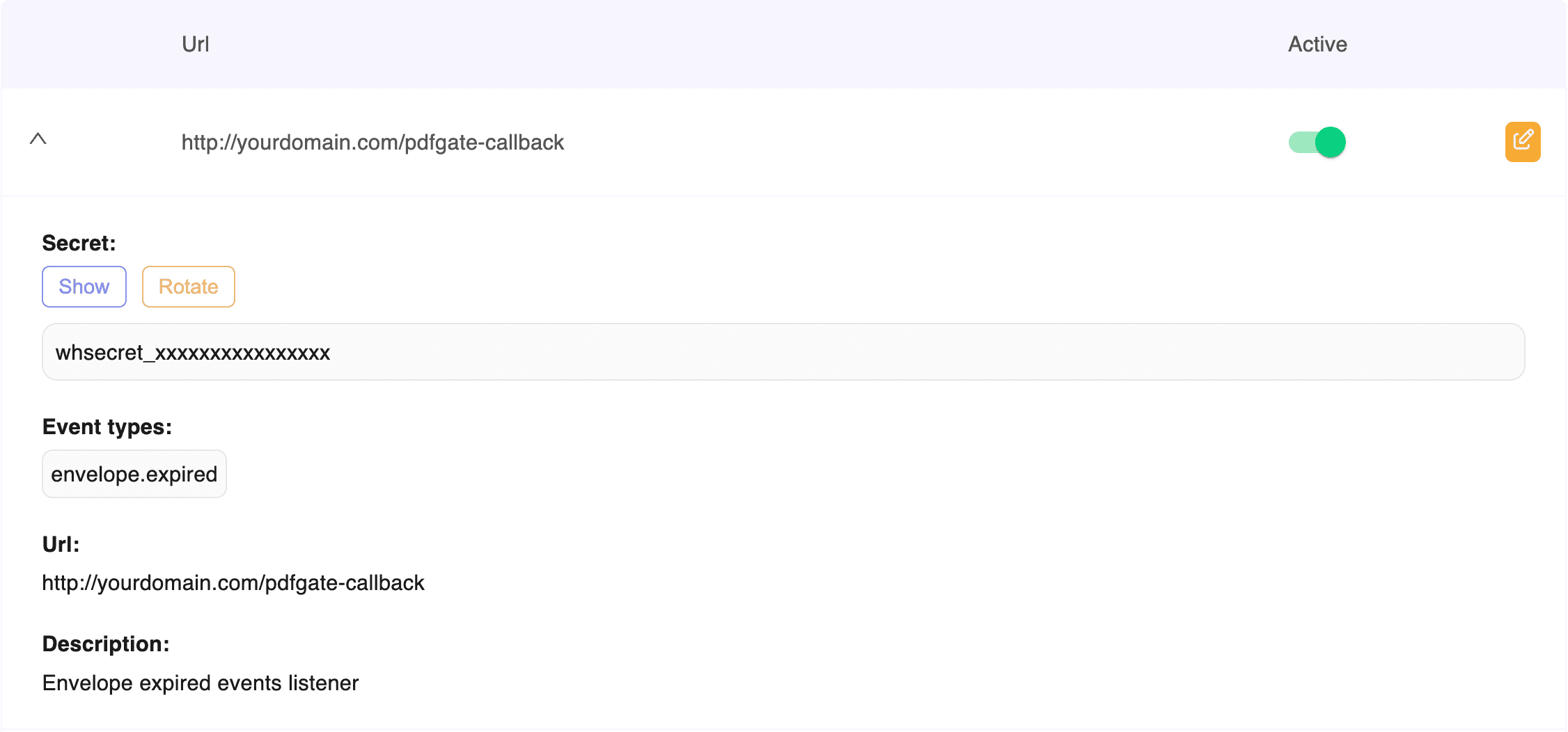
See below how a webhook configuration looks. In this example, we demonstrate a webhook endpoint that listens to the envelope.expired event. However, you can specify more events and listen to multiple events in the same webhook endpoint.
See below a minimal code example to verify your webhook works. It logs each event and responds with 200.
1import express from 'express';23const app = express();4const port = 3000;56app.use(express.json());78app.post('/pdfgate-callback', (req, res) => {9 console.log('Webhook received:', req.body);10 res.sendStatus(200);11});1213app.listen(port, () => {14 console.log(`Server running on port ${port}`);15});This example does not verify webhook signatures. For production use, see the signature verification section below.
Test webhooks locally
We recommend testing your webhooks locally using the third-party tool ngrok. First, copy the code snippet from the example above and run it. This will start your local server listening on port 3000. Then, open a new terminal and start an ngrok tunnel with the following command:
1ngrok http 3000Next, update your webhook URL host with the URL provided by ngrok. You can do this from the Dashboard or by creating a webhook endpoint with the API. It will look like: https://e0c2-xxxx.ngrok-free.app
Your webhook URL should be updated like: https://e0c2-xxxx.ngrok-free.app/{your_slug}
You should now start receiving webhook events on your local server.
Verify signature
Our official SDKs include a verification helper, so you don't need to implement these steps yourself. Pass your webhook secret, the x-pdfgate-signature header, and the raw request body. The helper parses the header, rejects timestamps older than 5 minutes, computes the HMAC-SHA256 signature, and compares it against every v1 value using a constant-time comparison. It throws if verification fails.
1import express from 'express';2import { verifySignature, PdfGateSignatureVerificationError } from 'pdfgate';34const app = express();56// Keep the raw body: the signature covers the exact bytes PDFGate sent7app.use(express.raw({ type: 'application/json' }));89app.post('/pdfgate-callback', (req, res) => {10 const secret = process.env.PDFGATE_WEBHOOK_SECRET; // whsecret_...1112 try {13 const event = verifySignature(secret, req.get('x-pdfgate-signature'), req.body);14 console.log('Verified event:', event.event, event.eventId);15 res.sendStatus(200);16 } catch (err) {17 if (err instanceof PdfGateSignatureVerificationError) {18 return res.sendStatus(400);19 }20 throw err;21 }22});2324app.listen(3000);Always pass the body exactly as received. If your framework parses JSON before your handler runs, the re-serialized body may differ from what PDFGate signed and verification will fail. The Node.js and Python helpers return the parsed event. The PHP, Java, and C# helpers return nothing on success, so parse the body yourself afterwards.
How the verification works
Each webhook request includes an x-pdfgate-signature header. Use this header to verify that the request was sent by PDFGate and that the payload was not modified in transit.
The signature header contains:
t: the Unix timestamp when the webhook was signedv1: one or more values that areHMAC-SHA256signatures
Example:
x-pdfgate-signature: "t=1712345678,v1=abc123,v1=def456"
To verify the webhook:
- Read the raw request body exactly as received
- Extract the timestamp and
v1signatures from thex-pdfgate-signatureheader - Build the signed payload as:
{timestamp}.{raw_body} - Compute the expected signature using HMAC-SHA256 and your webhook secret
- Compare the expected signature against all v1 signatures in the header
- Reject the request if:
- the signature is missing
- the timestamp is older than 5 minutes
- none of the provided signatures match
We may include multiple signatures during secret rotation. Your code should consider the webhook valid if any of the v1 signatures matches the expected value.
Event object
Each webhook delivers an Event type JSON payload:
1{2 "eventId": "69b8f935cde793a4db494e46",3 "event": "envelope.completed",4 "timestamp": "2024-01-01T12:00:00Z",5 "resource": {6 "kind": "envelope",7 "id": "69b78j35cde793a4db494ea7"8 },9 "data": {10 "envelope": {11 "id": "69b78j35cde793a4db494ea7",12 "status": "completed"13 }14 }15}Handle duplicate deliveries
Webhook deliveries may be retried and delivered out of order. Before applying updates, we recommend retrieving the current state of the referenced resource from the API to ensure consistency.
Retry behavior
If your endpoint does not return a 2xx status code, delivery is retried. Retries are scheduled relative to the original event time and processed by a background job every 3 minutes. After the final attempt, the webhook is marked as failed.
| Attempt | Delay |
|---|---|
| Attempt #1 | 5 minutes |
| Attempt #2 | 15 minutes |
| Attempt #3 | 1 hour |
| Attempt #4 | 6 hours |
| Attempt #5 | 24 hours |
| Attempt #6 | 48 hours |
Rotate signing secrets
If your signing secret is compromised, you can rotate it from the dashboard.
When rotation begins:
- A new secret is generated.
- A 24-hour grace period starts.
- Webhooks are signed using both the previous and new secret.
- The
x-pdfgate-signatureheader will include multiplev1values. - You should accept the request if any signature matches.
- After 24 hours, the old secret becomes permanently invalid.
If rotation is canceled during the grace period:
- The previous secret remains active.
- The new secret is discarded.