
- HTML to PDF APIConvert HTML and URLs into PDFsExtract PDF Form Data APIEasily extract data from PDFsWatermark PDF APIAdd custom watermarks to PDFsProtect PDF APISecure your PDFs with passwordCompress PDF APIReduce file size without losing qualityFlatten PDF APIFlatten PDFs to make form permanentDigital Signature APISend documents for signing
- API DocumentationAPI DocumentationFull REST API referenceNodeJS SDKClient library for Node.jsJava SDKClient library for JavaC# SDKClient library for C#PHP SDKClient library for PHPPython SDKClient library for Python
- Pricing
- Contact Us

HTML to PDF API
Convert your HTML or web pages into high-quality PDFs effortlessly. Our HTML to PDF API is designed for developers and businesses who need accurate, reliable, and scalable PDF generation. It delivers pixel-perfect rendering, supports fillable form fields, and handles complex layouts.
1const fetch = require("node-fetch");2const fs = require("fs");34const options = {5 method: "POST",6 headers: {7 "Content-Type": "application/json",8 "Authorization": "Bearer YOUR_API_KEY",9 },10 body: JSON.stringify({11 url: "https://en.wikipedia.org/wiki/PDF",12 pageSizeType: "a4",13 }),14};1516fetch("https://api.pdfgate.com/generate/pdf", options).then( async (result) => {17 if (result.status === 201) {18 result.body.pipe(fs.createWriteStream("file_name.pdf"));19 } else {20 const error = await result.json();21 console.log(error);22 }23});24Main Features
Explore the core rendering capabilities that make HTML to PDF conversion reliable at any scale.
Powered by Google Chrome
The API uses the latest Chrome rendering engine to generate PDFs that look exactly as they do in the browser, ensuring pixel-perfect accuracy with full CSS and JavaScript support.
Responsive Page Support
Easily convert responsive designs into PDFs that adapt beautifully across mobile, tablet, and desktop layouts. Your content will maintain its layout and readability on every device.
Framework-Friendly
Seamlessly render pages built with your favorite front-end frameworks and tools such as React, Angular, Tailwind, Vue.js, and more. No additional setup is required.
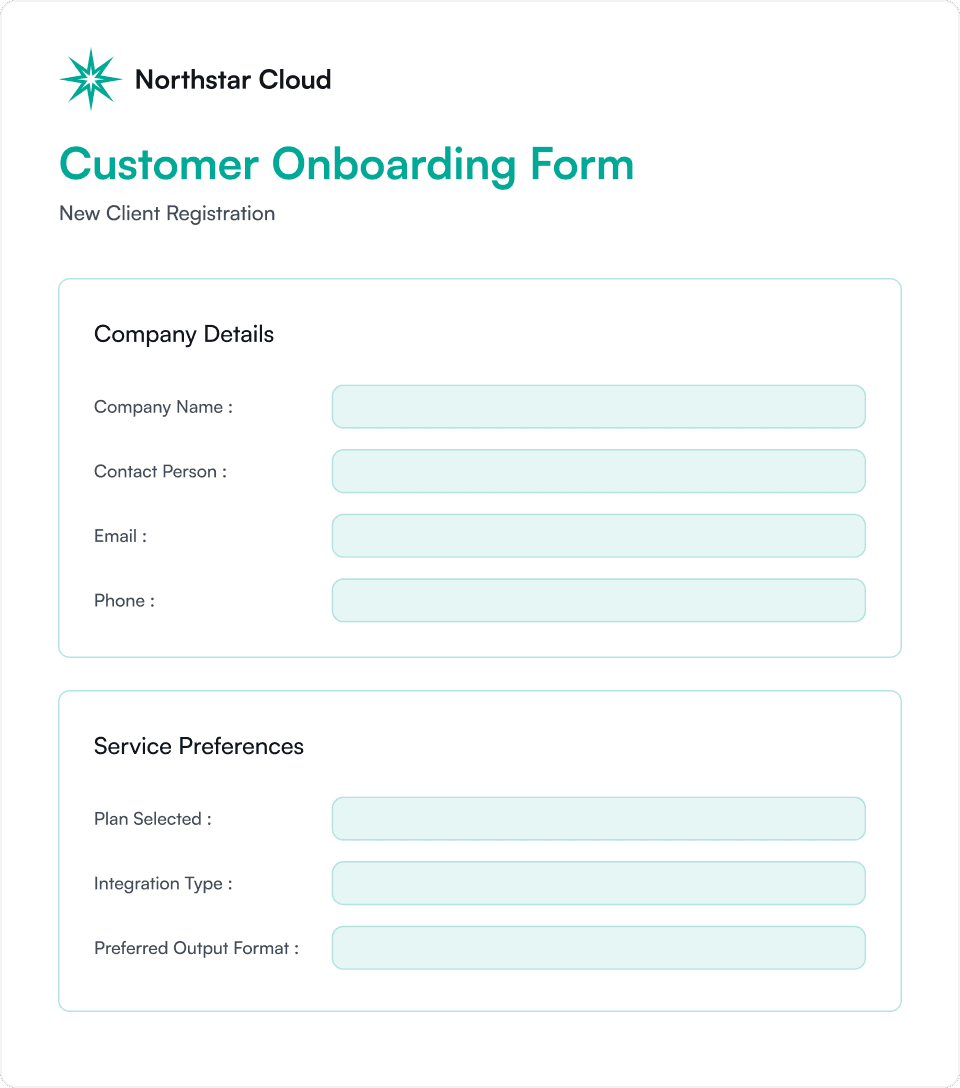
Create Fillable PDFs
Add Interactivity and Collect User Data from Your PDFs

✓ Transform HTML inputs into PDF fields
Convert standard HTML input elements directly into interactive PDF fields without any additional configuration.
✓ Support for all the common field types
Create fully interactive PDFs with text fields, date fields, dropdowns, radio buttons, checkboxes, multi-select lists, text areas, and digital signature fields.
✓ Customize appearance and behavior
Adjust the look and feel of each field by defining background colors, borders, and font sizes. Control field behavior with standard validations, prefilled values, and more. For practical examples of styling and configuration, see our fillable fields guide.
✓ Combine with Other Endpoints
Use it alongside other endpoints such as Flatten PDF or Extract Data to create a complete workflow for collecting, processing, and securing PDF form data.
Additional Customizations
Fine-tune rendering, layout, and interactivity to match exactly how your documents should look and behave.
Fine-Tune Every Detail
Control page margins, headers, and footers to achieve the perfect layout for your PDFs.
Flexible Page Options
Generate PDFs using standard paper sizes or define custom page width and height. Select specific page ranges to include only the content you need.
Enhanced Rendering Control
Enable lazy loading for images, inject custom JavaScript or CSS scripts, and set page delays to ensure complete content rendering.
Advanced Interactions
Wait for specific elements to appear or trigger clicks before capturing the page, giving you full control over dynamic and interactive content.
Full API Parameter List
Html
StringThe raw HTML content to be converted into a PDF. This can include full HTML documents or fragments, with support for inline styles, custom fonts, JavaScript, and media queries. The HTML will be rendered as a PDF using our headless browser.
Url
StringThe public URL of the web page to convert into a PDF. The page must be accessible over the internet and should return a complete HTML document.
Json Response
BoolWhen set to true, the API will return a JSON response instead of streaming the generated PDF file. The JSON includes a secure download URL and metadata about the PDF. This is useful for workflows where you want to store, inspect, or delay the download of the PDF rather than receiving it immediately in the response body.
Page Size Type
EnumSpecifies the paper size for the generated PDF. Such as A4, Tabloid and Letter.
Page Ranges
StringDefines the page range to include in the PDF.
Width
NumberSets a custom width for the generated PDF in pixels. This overrides the default paper size and is typically used for responsive or non-standard layouts. When using width, you should also set the height parameter. This option is ideal for precise control over PDF dimensions.
Height
NumberSets a custom height for the generated PDF in pixels. Use this to define non-standard page sizes for dynamic layouts. When specifying height, you should also provide the width parameter. This allows full control over the final PDF dimensions and layout.
Orientation
EnumSpecifies the page orientation for the generated PDF. Accepted values are portrait and landscape. This setting affects the layout and flow of content across the page, especially for horizontal designs. The API defaults to portrait if it is not specified.
Scale
NumberDefines the page scale factor used when generating the PDF. Accepts values between 0.1 and 2.
Header
StringThe HTML content to display as a fixed header on every page of the generated PDF. This can include text, logos, tables, or styled elements, and supports inline CSS for full customization. Ideal for adding company branding, document titles, page numbers, or dates to the top of each page.
Footer
StringThe HTML content to display as a fixed footer on every page of the generated PDF. Supports text, images, tables, and inline CSS for full customization. Common uses include adding page numbers, disclaimers, timestamps, or company contact information at the bottom of each page.
Margin
ObjectSets the page margins for the generated PDF in pixels. Accepts an object with optional properties: top, right, bottom, and left. This allows precise control over content spacing and layout.
Timeout
NumberSpecifies how long the API waits (in milliseconds) for the HTML content to fully load and render before generating the PDF. This option is useful for pages with dynamic or slow-loading content. The default value is 15 minutes, and in most cases you won't need to change it. You may want to reduce the timeout when debugging, especially if a page is hanging and you want the request to fail faster.
Delay
NumberAdds a delay (in milliseconds) before converting the HTML content into a PDF. This is useful when asynchronous content requires additional time to fully render.
Load Images
BooleanWhen enabled, the API waits for all images to finish loading before generating the PDF. This helps prevent missing or partially rendered images.
Javascript
StringDefines custom JavaScript code to be executed after the HTML content is loaded but before the PDF is generated.
Css
StringCustom CSS styles to apply to the HTML content before rendering it to PDF. This allows you to override default styles, add branding, adjust layouts, or control print-specific formatting.
Emulate Media Type
EnumSets the CSS media type used when rendering the HTML to PDF. Accepted values are screen and print. This controls which CSS media queries are applied. Use print to apply print-specific styles (e.g., hide navigation, adjust layout), or screen to render the PDF as it appears in a browser.
Wait For Selector
StringDelays PDF generation until a specific CSS selector is present in the DOM. The renderer will wait until the element matching the selector appears or until the timeout is reached.
Click Selector
StringWaits for an element matching the given CSS selector to appear on the page, then simulates a click before rendering the PDF. Useful for triggering UI interactions such as opening modals, expanding sections, loading hidden content, or accepting cookie banners. This action occurs after the page loads but before PDF generation begins.
Click Selector Chain Setup
ArrayProvides advanced control for handling cookie banners, consent dialogs, pop-ups, and multi-step UI interactions before the PDF is generated. This option extends and improves upon the simpler clickSelector parameter by allowing a sequence of interactions to be executed in order. When this parameter is defined, the clickSelector field is ignored.
Wait For Network Idle
BooleanWhen set to true, this delays PDF generation until the page has no active network connections. This ensures that all resources such as images, fonts, and JavaScript-loaded content are fully loaded before rendering. It is especially useful for pages with asynchronous or delayed content loading.
User Agent
StringSpecifies the user agent string used when rendering the HTML, allowing you to control how the content is served and displayed.
Http Headers
ObjectDefines custom HTTP headers to be sent when loading the HTML or URL for PDF generation. Useful for passing authentication tokens, cookies, or custom headers required by your web application.
Enable Form Fields
BooleanWhen set to true, the generated PDF will include interactive AcroForm fields that users can fill out directly in PDF viewers such as Adobe Acrobat or browser-based PDF readers. This is ideal for creating fillable forms, applications, contracts, or surveys from HTML input elements like <input>, <select> and <textarea>.
Pre Signed Url Expires In
NumberAllows you to temporarily view the generated PDF in the browser without authorized access, using a secured URL that expires after the time you specify. The value is provided in seconds, and the maximum expiration time is 1 day.
Metadata
ObjectAdds custom metadata to the document record. This information is not embedded in the PDF file itself, but can be used for tracking, tagging, or associating the document with related data in your system. You may include any key-value pairs relevant to your application.
Guides and resources
Learn how to get the most out of the HTML to PDF API, and see how it compares with other tools.
Guides
- How to Add Headers and Footers to PDFs
- HTML to PDF with Fillable Form Fields
- How to Generate PDFs from Authenticated Pages
- How to Wait for Dynamic Content Before Generating a PDF
- How to Set PDF Page Size, Margins, and Orientation
- How to Remove Cookie Banners and Pop-ups Before Generating a PDF
- How to Use Custom Fonts and Images in HTML to PDF
Articles
- HTML to PDF in C#: From Razor Markup to a Streamed Invoice
- HTML to PDF in Java: Thymeleaf Templates to Finished PDFs
- HTML to PDF in Python: Django, Flask and FastAPI Covered
- HTML to PDF in Node.js: From a Script to an Express Route
- HTML to PDF in PHP: Blade Invoices From a Laravel Controller
- Best HTML to PDF APIs for Fillable Forms: 6 APIs Tested on the Same Form
- HTML to PDF Page Breaks: How to Control Them with CSS
- How to Generate PDFs in Different Languages: Localized, Multilingual, and RTL PDFs
- Automating Invoice Generation with HTML to PDF
- Converting a Web Page to PDF
Frequently Asked Questions
Learn more about PDFGate.
It is a tool or an online service that can transform web content (HTML, CSS) into a PDF file. It is used by software teams to generate reports, invoices, or other documents because of its simplicity.
Yes. Our API includes dedicated endpoints for PDF watermarking and encryption. After generating a PDF from HTML, you can apply password protection and/or a watermark using the appropriate endpoints.
Yes, batch conversions are supported. Be sure to manage concurrency according to the limits defined in your plan.







Start building with PDFGate today
Generate PDFs, send documents for signature, and automate your document workflows in minutes.
Free trial · No credit card required